


For compatible Switch systems
Designed for Nintendo Switch use with TV-mode support. Check your exact console model before ordering. Nintendo Switch Lite does not support TV output.
🎃 HALLOWEEN FAVORITES ARE HERE
🖤 DARKLY BEAUTIFUL — elevated picks for spooky season
🎃 HALLOWEEN FAVORITES ARE HERE
🖤 DARKLY BEAUTIFUL — elevated picks for spooky season
🎃 HALLOWEEN FAVORITES ARE HERE
🖤 DARKLY BEAUTIFUL — elevated picks for spooky season
🎃 HALLOWEEN FAVORITES ARE HERE
🖤 DARKLY BEAUTIFUL — elevated picks for spooky season
🎃 HALLOWEEN FAVORITES ARE HERE
🖤 DARKLY BEAUTIFUL — elevated picks for spooky season
🎃 HALLOWEEN FAVORITES ARE HERE
🖤 DARKLY BEAUTIFUL — elevated picks for spooky season
🎃 HALLOWEEN FAVORITES ARE HERE
🖤 DARKLY BEAUTIFUL — elevated picks for spooky season
🎃 HALLOWEEN FAVORITES ARE HERE
🖤 DARKLY BEAUTIFUL — elevated picks for spooky season
🎃 HALLOWEEN FAVORITES ARE HERE
🖤 DARKLY BEAUTIFUL — elevated picks for spooky season
🎃 HALLOWEEN FAVORITES ARE HERE
🖤 DARKLY BEAUTIFUL — elevated picks for spooky season
🎃 HALLOWEEN FAVORITES ARE HERE
🖤 DARKLY BEAUTIFUL — elevated picks for spooky season
🎃 HALLOWEEN FAVORITES ARE HERE
🖤 DARKLY BEAUTIFUL — elevated picks for spooky season
🎃 HALLOWEEN FAVORITES ARE HERE
🖤 DARKLY BEAUTIFUL — elevated picks for spooky season
🎃 HALLOWEEN FAVORITES ARE HERE
🖤 DARKLY BEAUTIFUL — elevated picks for spooky season
🎃 HALLOWEEN FAVORITES ARE HERE
🖤 DARKLY BEAUTIFUL — elevated picks for spooky season
🎃 HALLOWEEN FAVORITES ARE HERE
🖤 DARKLY BEAUTIFUL — elevated picks for spooky season
You're $55 away from FREE shipping!


Couldn't load pickup availability


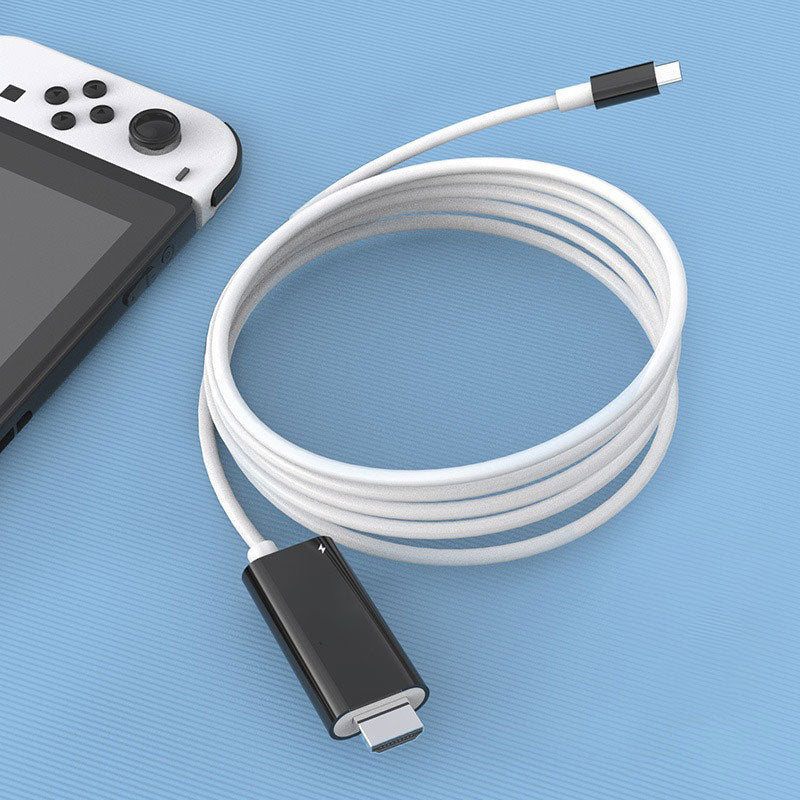
Bring your compatible Switch to an HDMI screen with a compact cable that combines a display connection and a USB-C charging input. Easy to pack for a weekend away or game night at a friend’s place.

Keep a compact display connection in your gaming bag. The integrated HDMI plug connects directly to a TV or monitor, while the USB-C end connects to your compatible console.

A display connection and charging input in one portable cable design.

Designed for Nintendo Switch use with TV-mode support. Check your exact console model before ordering. Nintendo Switch Lite does not support TV output.
Compatible phones, tablets and laptops must support video output through USB-C, such as DisplayPort Alt Mode. A charging or data-only USB-C port is not enough.
An integrated cable keeps your display connection and charging input together in a compact setup. Connect a suitable USB-C PD power supply to play and charge, and keep it connected for Switch TV-mode use.

Connect a suitable USB-C PD power supply to the adapter’s charging input for simultaneous charging and display use.
The integrated cable coils down for storage, making it convenient to carry alongside your console and power supply.
The PD input supports up to 100W. Actual charging power depends on your device, compatible power supply and charging connection. Your Switch will not charge at 100W simply because the adapter supports that maximum.
Give your console some space beside the screen, then coil the cable for storage when you’re done. Choose a playful pink-blue finish or a classic white-black combination.

Small measurement differences may occur. Colors can vary slightly with lighting and screen settings.
Connect a suitable USB-C PD power supply to the adapter’s charging input.
Insert the HDMI plug into your TV or monitor and select that HDMI input.
Connect the USB-C device plug to your compatible Switch and follow the included setup instructions.
Swipe to see all three steps →
No. Nintendo Switch Lite does not support TV output, and an adapter cannot add that function. Check your exact console model’s compatibility before ordering.
No. Your device must support video output over USB-C, such as DisplayPort Alt Mode. Check the device specifications; a USB-C port used only for charging or data will not provide a picture.
Yes, on compatible devices. Connect a suitable USB-C PD power supply to the adapter’s charging input. Keep the power supply connected when using your Switch in TV mode.
No. It is the adapter’s maximum supported PD input rating. Actual charging power depends on the connected device, power supply and charging connection.
No separate HDMI cable is needed for this connection: the adapter cable has an integrated HDMI plug for your screen. You will still need a compatible device, an HDMI TV or monitor and a suitable power supply.
The cable measures approximately 2 m (6.6 ft). Choose Pink-Blue or White-Black from the available product options.
A compact cable, a compatible screen and your favorite games. Keep the connection simple wherever you set up.